

Picking the right digital vision board app means finding a layout you will still open in March—not just a pretty wallpaper generator you abandon after New Year's weekend. The best platforms pair drag-and-drop imagery with captions, concrete milestones, and a realistic daily check-in so pictures stay connected to real decisions.
Best Digital Vision Board Apps (Free & Paid) and How to Make One That Works

Jennie Uyen Chu
意识与能量专家
本文目前仅有越南语版本,中文版正在翻译中。
互动实践数字系统 · 完整版10 个模块
数字愿景板与 2027 显化工具包
你的愿景每天都在眼前,并化为清晰的季节目标,成真墙则让你看到已经实现的事。
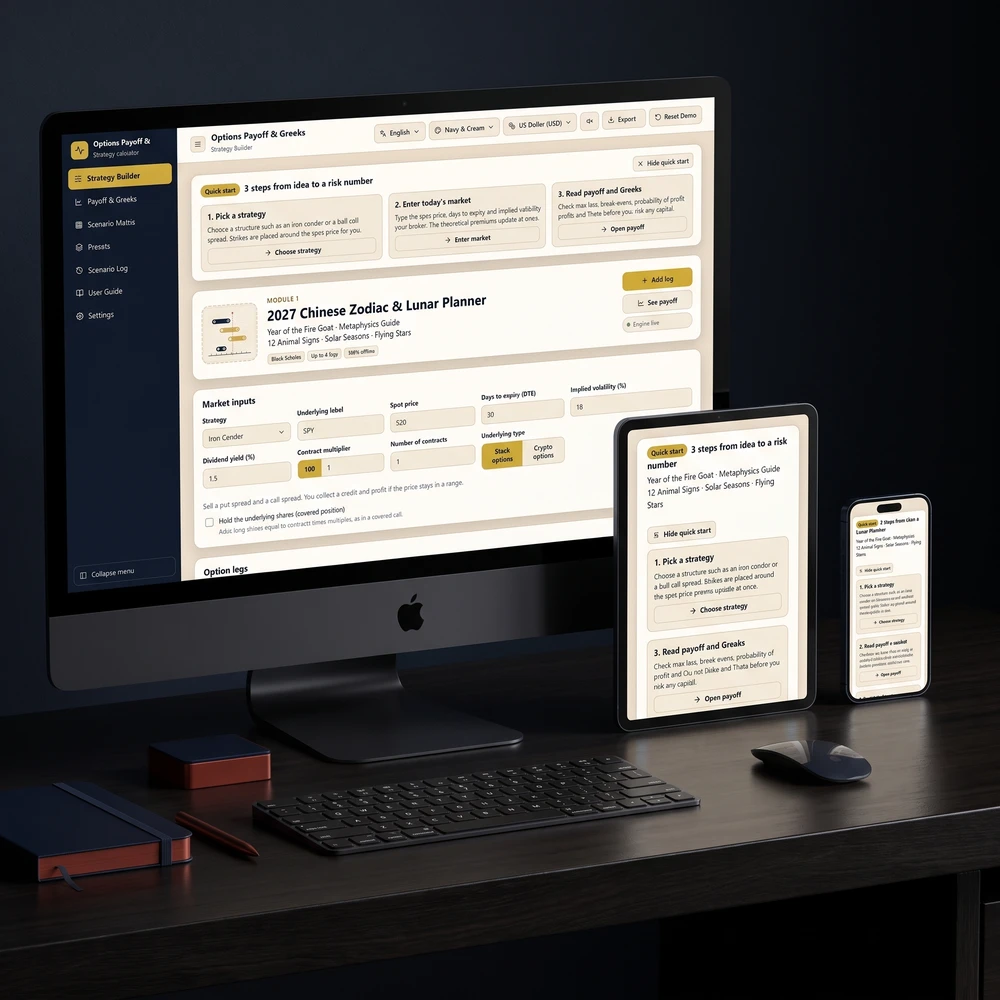
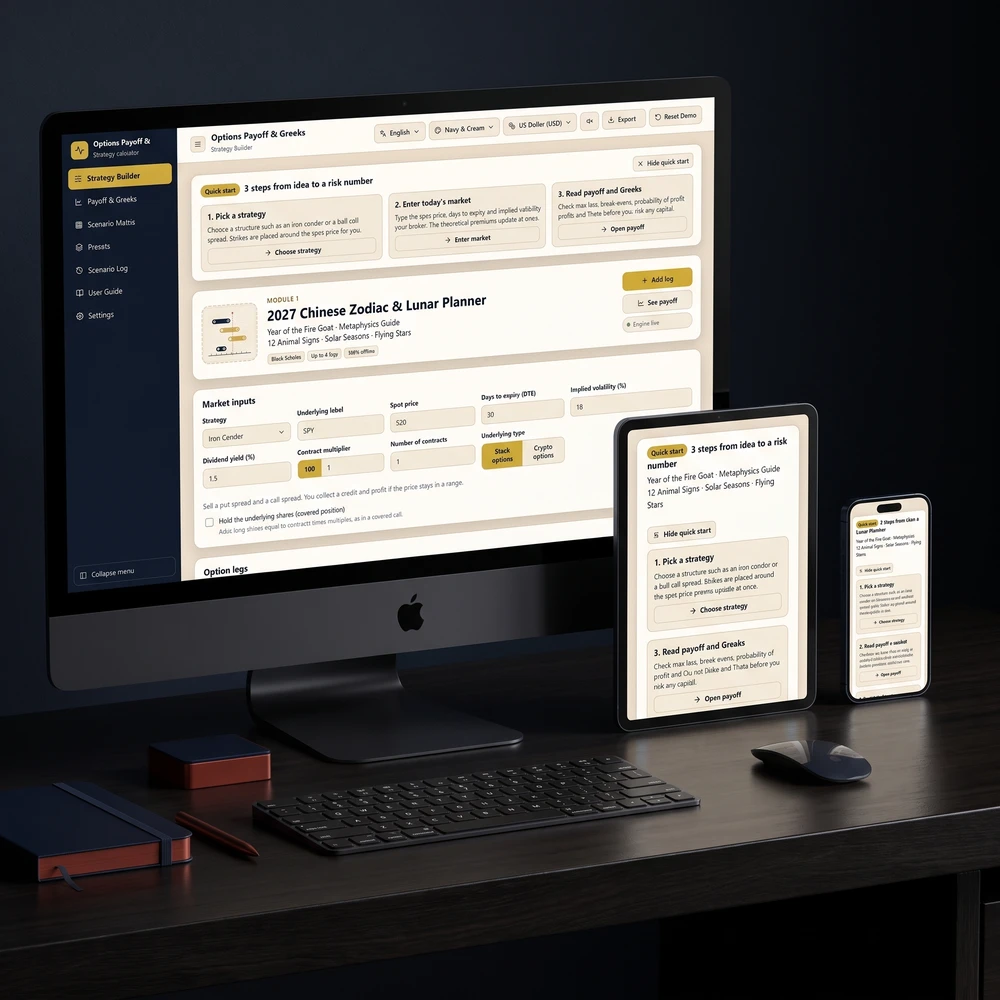
网页应用,手机或电脑都能用。用自己的照片打造愿景板,按季节设定 2027 目标,并播放引导观想。无需填写出生日期。
👥 3.8万+学员👥 38,000+ 学员 · 240万+ 社群
US$39US$29.25US$39₫1,019,000₫764,000₫1,019,000第 1 步 · 点击你平时最容易半途而废的痛点:
这套应用如何帮你彻底解决
你的愿景板在手机、平板和笔记本上,还能设为壁纸,让你每天都看见自己的愿景。
内含对应工具: 2027 目标分布在播种、生长、绽放、收获四个季节列中,每个都有进度和对应图片的链接。
第 2 步 · 直观查看应用真实模块界面
愿景工作室总览台
10 个模块 · 2 个免费试用标签页总控面板统筹季度生活主题、核心目标支柱及视觉化观想工具入口。
一次买断 · 终身可用 · 付款后即刻发送至邮箱

免费领取 2027 天使数字年度地图
通过邮件领取《2027 天使数字年度地图》,内附 2027 个人年速查、每个月的天使数字与全年意图书写空间。
Static collages fail mostly because looking at dreamy photos without an action plan can actually drain motivation. Before building your next collage, explore what goes on a vision board from five real readers who kept theirs active by pairing every image with a caption and one next step.
7 Best Free & Paid Digital Vision Board Apps Compared
Whether you prefer a free visual canvas, a Notion vision board template, or an interactive private web app with seasonal goal columns and affirmations, the comparison below lays out each tool's actual workflow and limits. Research in process versus outcome mental simulation by Pham and Taylor found that visualizing the concrete steps toward a goal improves follow-through far better than picturing the finished outcome alone.
免费在线测算工具
生命灵数计算器
快速解答
有。数字愿景板与 2027 显化工具包 — 愿景板制作、目标、肯定语与引导观想正是为此设计:用你自己的照片和文字打造 8 块主题愿景板:拖动、缩放、旋转,再把其中一块存为手机壁纸。
 数字愿景板与 2027 显化工具包 — 愿景板制作、目标、肯定语与引导观想查看交互式手册 →
| Tool or App | Tier & Access | Core Collage & Planning Features | Best For | Key Tradeoff |
|---|---|---|---|---|
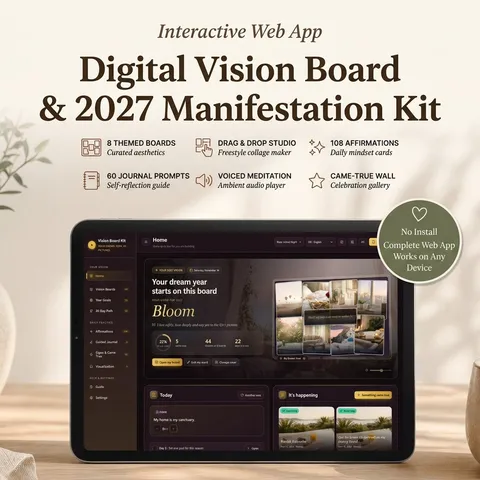
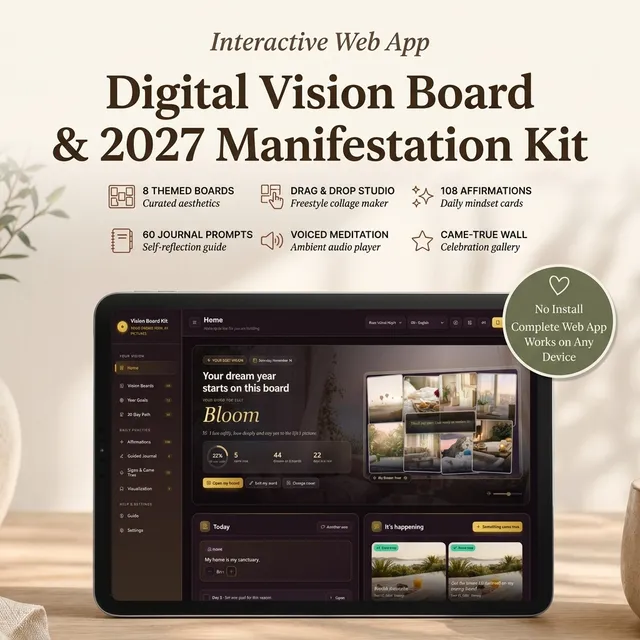
| Digital Vision Board & 2027 Manifestation Kit | One-time purchase offline web app (desktop, tablet, phone) | 8 themed boards, drag/resize/rotate studio, seasonal goals (Plant/Grow/Bloom/Harvest), 108 affirmations, 60 journal prompts, ~10-min voiced visualization, wallpaper export | Linking images directly to seasonal goals, affirmations, and daily check-ins privately | Browser local storage requires exporting a monthly backup; solo tool without social sharing |
| Canva | Free tier + paid Pro tier (web, iOS, Android) | Thousands of collage layouts, font pairings, stock photos, easy export to phone lock-screen or print dimensions | Fast visual design and graphic polish when you only need a finished image file | Images remain static once exported; no built-in goal tracker, signs log, or affirmation counter |
| Pinterest & Shuffles | Free ad-supported app (web, iOS, Android) | Huge discovery catalog, private secret boards, cutout sticker collages on Shuffles mobile app | Gathering initial visual inspiration cleanly before narrowing down 6 to 10 final photos | Algorithmic feeds and shopping pins quickly turn five-minute reflection into scrolling distraction |
| Notion | Free personal tier + paid tiers (web, desktop, mobile) | Customizable gallery databases where image cards open into full subpages for tasks, habits, and dates | Users already organizing work and personal notes inside a structured Notion workspace | Requires manual database setup before starting; full cloud sync slows offline journaling |
| Milanote | Free tier (up to 100 cards) + paid Pro tier | Freeform spatial pinboards combining photos, short text notes, color swatches, checklists, and links | Visual thinkers mapping long-term creative or lifestyle moodboards on larger desktop screens | Designed for creative project briefs rather than affirmation counters or seasonal review prompts |
| Apple Freeform | Free built-in app on iPhone, iPad, and Mac | Infinite zoom canvas, clean photo placement, sticky notes, hand-drawn arrows via Apple Pencil, iCloud sync | Zero-friction Apple users sketching quick visual maps with native hardware integration | Apple-exclusive ecosystem; no structured 30-day routine, guided audio, or goal progress bars |
| Padlet | Free limited boards + paid tiers (web, mobile) | Grid, wall, and shelf columns mixing uploaded photos, short notes, and links cleanly across browsers | Quick browser-based seasonal columns without graphic design alignment headaches | Classroom/collaboration interface feels more functional than restorative for quiet personal rituals |
Free Tools vs. One-Time Vision Board Apps: What Actually Differs
Starting with a free tool is smart if you just want to test whether visual cues hold your attention for thirty days. Tools like Apple Freeform, Pinterest secret boards, or Canva's free collage maker cost nothing upfront and let you export crisp phone lock-screen images in under fifteen minutes.
Where free collage tools usually stall by February is separation: your lock screen sits on your phone, your to-do list sits in a calendar, and your written affirmations sit buried in notes. When three tools never touch, visual inspiration turns into decorative background furniture. One-time private web apps close that gap by keeping boards, seasonal goal percentages, and reflection logs on one offline canvas stored directly on your device—with zero monthly subscriptions or algorithmic clutter.
Notion Vision Board Template, Pinterest, and Action-Linked Examples
If you enjoy building inside Notion, a custom Notion vision board template works best when kept radically small. Instead of thirty aesthetic pictures pasted onto a massive dashboard, create one simple database in Gallery view showing 6 to 8 high-priority focus cards across Wealth, Career, Health, Travel, and Home. Set Card Preview to “Page Cover,” then add just two properties inside each page: “This Season's Step” and “Target Quarter.”

For readers who prefer skipping database setup entirely, the Digital Vision Board & 2027 Manifestation Kit opens directly in any browser on laptop, tablet, or phone and runs offline. Inside its drag-and-drop studio, you organize eight themed boards (Dream Life, Love, Wealth, Career, Health, Dream Home, Travel, and Self-Love) using either your own photos or 18 curated images across collage, grid, spotlight, or mosaic layouts. Every board ties into four 2027 seasonal columns—Plant, Grow, Bloom, and Harvest—alongside 108 affirmations (with one-click placement straight onto a board), 60 journal prompts, a Came-True wall, a signs log, and an ~10-minute voiced visualization called Step Into Your Vision. You can also export any finished layout as an image file or phone wallpaper without losing private ownership of your entries.
How to Choose the Best Online Vision Board App (and Run a 5-Minute Routine)
Choosing the best online vision board app doesn't depend on how many stickers an app includes—it depends on how easily you will interact with it during an ordinary workweek. Use research on positive fantasies and mental contrasting (WOOP) to avoid the trap of daydreaming without friction planning: pair every inspiring image with one concrete obstacle you expect to meet and one tiny if-then action.
Before Looking at Your Board: The 30-Second Somatic Reset
Scrolling visual goals while rushed or stressed often triggers comparison rather than calm direction. Before opening your board each morning, spend 30 seconds physically settling: uncross your ankles, drop your shoulders away from your ears, soften your jaw, and take two slow breaths inhaling for four seconds and exhaling for six seconds. Starting calm keeps you focused on steady effort rather than urgency.
The 5-Minute Action-Then-Release Routine
- Minute 1 — Open One Active Theme: Pick just one focus board (such as Career or Health) instead of glancing over forty scattered pictures.
- Minutes 2–3 — Read Your Image Caption & Say One Affirmation: Say one believable sentence attached to a specific picture aloud—for structured phrasing ideas, borrow the concise card format from our Bob Proctor goal card guide.
- Minute 4 — Complete or Schedule One Physical Step: Move one tangible needle today for 10 minutes—update a portfolio slide, book a lesson, or transfer savings—echoing the practical loop inside how to make manifestation real.
- Minute 5 — Close & Return Tonight Only to Log Wins: Put your phone wallpaper or tab away cleanly, then spend thirty seconds before bed logging completed steps or unexpected openings inside your signs journal.
If you want structured writing tools to sit alongside your visual boards, explore our comparison of the best manifestation journals. Whichever tool you pick, keep the image count honest, pair every photo with one weekly action, and save a monthly backup copy of everything you build.
同主题免费在线测算工具

马上实践
把这篇文章用起来
8多年来,超过240万人的社群一直在用这套练习,3.8万+名学员也陆续分享了自己的结果。
参考来源与核验资料
- [1]Oettingen & Mayer — The Motivating Function of Thinking About the Future (PMC3759023) ↗
- [2]Pham & Taylor (1999) — From Thought to Action: Mental Simulations on Performance ↗
- [3]WOOP Method — Mental Contrasting with Implementation Intentions ↗
依据正念实操与个人成长编辑规范审校。 编辑政策

真实故事
查看全部故事 →读者如何因这些练习而改变
8多年来,超过240万名关注者和3.8万+名学员组成的社群,分享了坚持这些练习后在爱情、财富和内心平静上的真实变化。
 爱情故事
双生火焰日记有用吗?真实故事与每日练习
双生火焰日记真的有用吗?分享走出分手、迎来灵魂伴侣、找回平静的真实经历,并展示每天的练习在日记里是什么样子。
阅读指南 金钱故事
金钱显化日记有用吗?真实故事
金钱显化日记真的有用吗?分享还清欠款、争取加薪、缓解金钱焦虑的经历,并展示每天的练习在日记里是什么样子。
阅读指南
 爱情故事
分手后如何显化爱情:真实疗愈故事
分手后如何显化爱情?分享人们如何用自爱肯定语、照镜子练习和爱情日记先疗愈自己,再重新敞开心扉的真实经历。
阅读指南 金钱故事
显化无债生活:稳步还清欠款的真实故事
如何显化无债生活?分享人们如何把金钱肯定语、丰盛日记与清晰目标、截止日期和每日证据结合起来,稳步走向无债。
阅读指南 爱情故事
显化灵魂伴侣:从内在开始的真实故事
如何显化灵魂伴侣?分享人们如何写下理想伴侣脚本、制作爱情愿景板,并在爱到来之前先对生活说“好”。
阅读指南 金钱故事
显化加薪:自信开口的真实故事
如何显化加薪或升职?分享人们如何清理金钱信念、练习自信肯定语,并在开口前记录下自己的成绩。
阅读指南 爱情故事
双生火焰重逢故事:走向平静的真实旅程
真实的双生火焰重逢故事:人们如何借助旅程阶段、征兆记录和引导冥想,在分离期间找回平静,无论最终是否重逢。
阅读指南 金钱故事
从金钱焦虑到与钱和解:真实故事
分享缓解金钱焦虑的经历:查看账户前听一段简短的引导冥想,每周一次金钱约会,并温和地审视旧信念。
阅读指南
相关指南
继续阅读
阅读量最高的指南


热门内容
本周读者最常打开的内容
按过去 7 天的真实访问量排序。
免费互动指南
免费领取 2027 天使数字年度地图
通过邮件领取《2027 天使数字年度地图》,内附 2027 个人年速查、每月指引天使数字与专属年度意图书写空间。
关注我们
每天的仪式,就在你的动态里
Yin Yang Masters 的简短指南、月相仪式和计划本使用教程。




在 AI 助手中直接询问 Yinyang Masters
在聊天中获得同样的计算与指引:添加免费的 Yinyang Masters 应用,然后用日常语言提问。无需注册账号。
试着问: “找一篇关于开始每日灵性练习的 Yinyang Masters 指南。”

正在直播
认识 Moon Keeper,我们的直播祭坛守护者
Moon Keeper 每小时观察星象、抽一张塔罗牌,并分享一段 3 分钟的静心练习。来祭坛看看,关注每小时日记,并在留言簿里写下你的话。

每日免费通讯
每天收到 Yin Yang Masters 通讯
每天一封简短邮件:一个今日练习、一个读者的真实故事,以及关于爱情、财富与内心平静的最新指南。
8多年来,超过240万名关注者和3.8万+名学员组成的社群,分享了坚持这些练习后在爱情、财富和内心平静上的真实变化。