


Deep Work & Focus PlannerDeep Work & Focus Planner — Time Blocking, Focus Timer & Second Brain Dashboard
Web app for phone or laptop. Plan deep work blocks per project and run focus sessions with the built-in timer. No birth date needed.
Time Blocking, Focus Timer & Second Brain Dashboard
Plan deep work blocks, run focus sessions with a timer, and see whether your focused hours went where you meant them to.
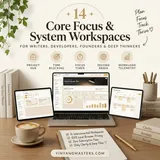
One web app instead of a planner, a separate timer and loose notes: projects, focus blocks, the timer and notes connected, on phone or laptop.
Over 8 years, members of a 2,400,000-strong community, including 38,000+ students, have reported real changes after keeping these practices up.
Add Habit Tracker & Streak Planner — both in one checkout
Add this companion web app and get both in one checkout:

14-day refund policy ·Read the terms
- Ready to use right after payment
- Secure checkout by Stripe
Before you buy
What's inside
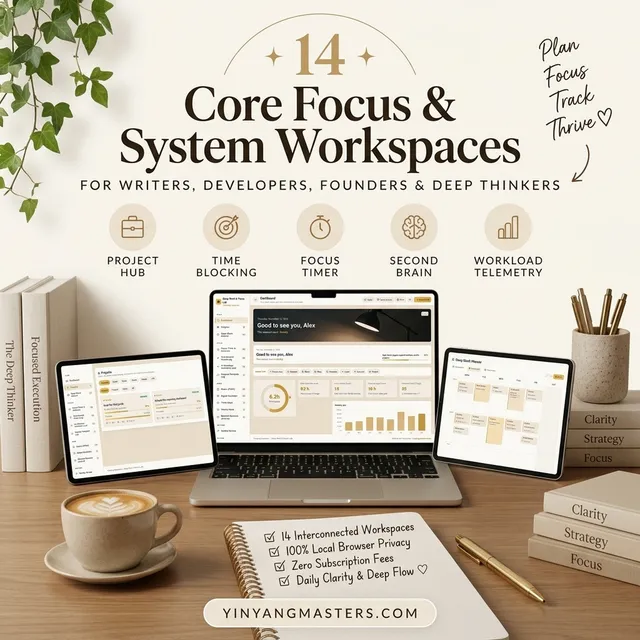
- The Deep Work & Focus Planner web app (14 screens)
- Sample data (three made-up projects and five weeks of sessions) so you can see everything connected, plus a "Start with a clean slate" button
- A built-in guide and a quick-actions menu (Ctrl+K or Cmd+K)
- English, Vietnamese and Chinese interfaces, with several color palettes
- Goals you set yourself: weekly deep hours, minutes that make a streak day, and your break rule
How to use it in 3 steps
- 1Open it and spend five minutes in Settings: palette, language, weekly deep-hours goal and break rule.
- 2Add one real project. Work that deserves focused hours.
- 3Run a focus session. Choose the project, press Start, work, then press "Finish and save" and take your break.
This deep work planner is built for people whose work needs long, uninterrupted stretches. Everything hangs off a project: sessions, planned blocks, notes, decisions and more attach to it, so your focus tracker answers a real question, did my focused hours go where I meant them to? It is a web app that opens in your browser, works offline and saves on your device.
At a Glance
- Format: Web app (opens in your browser, works offline, saves on your device)
- Devices: Computer, tablet and phone browsers (Chrome, Safari, Edge, Firefox)
- Privacy: Your notes and sessions stay on your device. Nothing is uploaded.
- Export: Print to PDF, CSV spreadsheets, full backup and restore
Key Capabilities
- Projects: the hub. Open one to see every session, block, note and decision attached to it, and link or unlink items from the same panel.
- Deep Block Planner: a seven-day grid of focus blocks, each with one intended output, overlap warnings, and planned hours compared with your weekly goal.
- Focus Timer & Sessions: a flexible timer with an interruption counter. Your break is calculated from the time you worked, and every session is logged with quality and interruptions per hour.
- Five-Second Action Log: count down 5-4-3-2-1, act, and record whether you acted or hesitated. See your action rate and the most common friction.
- AI Assistant Workflow Load: log context switches, open tools and fatigue to get a daily load score and spot overloaded days.
- Request Template Log: keep the wording of requests that work, count hits and misses, and find your best template.
- Notes (PARA): file notes as project, area, resource or archive, link them, and spot orphan and stale notes. This works as a simple second brain dashboard.
- Digital Declutter: score items, decide keep, archive or remove, and track items cleared.
- Think Week: a big question, a reading list with pages-per-day needed, takeaways and a decision.
- Minimal Decision Journal and Weekly Review: record what you said no to, then close the week with twelve numbers already filled in.
Who It's For
Writers, analysts, developers, students, founders and freelancers, especially anyone who works alongside an AI assistant and wants to protect long stretches of attention. It suits you if you have separate timers, notes apps and checklists and want them to talk to each other.
What's Included
- The Deep Work & Focus Planner web app (14 screens)
- Sample data (three made-up projects and five weeks of sessions) so you can see everything connected, plus a "Start with a clean slate" button
- A built-in guide and a quick-actions menu (Ctrl+K or Cmd+K)
- English, Vietnamese and Chinese interfaces, with several color palettes
- Goals you set yourself: weekly deep hours, minutes that make a streak day, and your break rule
How to Use It
- Open it and spend five minutes in Settings: palette, language, weekly deep-hours goal and break rule.
- Add one real project, work that deserves focused hours.
- Run a focus session: choose the project, press Start, work, then press "Finish and save" and take your break.
- Plan the week in the Deep Block Planner and compare planned hours with your goal.
- Close the week in the Weekly Review: add what went well, what drained your focus and one change.
This is a self-organization tool. It is not medical, psychological or professional advice and it promises no result. Rest is part of the work; if you feel unwell or exhausted, stop. Please do not type passwords or private client details into notes.
Questions before you buy
Any computer, tablet or phone with a modern browser such as Chrome, Safari, Edge or Firefox. It is a web app that opens in your browser.

Deep Work & Focus Planner
Pay once. No monthly fee. Ready to use right after payment.
You may also like


How readers changed with these practices
For more than 8 years, a community of over 2,400,000 followers and 38,000+ students has shared how these daily practices helped in love, money and inner calm.
 Real stories
Deep Work Tracker Results: Real Stories
Does a deep work tracker help? Real stories of more focused hours, fewer interruptions and calmer weeks, plus the daily practice inside the lab.
Read guide Real stories
Does Time Blocking Work? Real Planner Stories
Yes, time blocking works when it shows how much of your day is really free. Real stories of calmer days, fewer carry-overs and the planner behind them.
Read guide
Guides featuring this tool

From the blog
Latest articles



You may like
Popular with readers like you
The guides people search for most.

Turn what you just read into a daily practice
Interactive planners and journals built on these guides: moon rituals, manifestation scripting, habit and focus systems. Ready to use right away and yours to keep.

Get the Yin Yang Masters Letter Every Day
One short email a day: a practice for today, a real reader story, and the newest guide on love, money and inner calm.
Follow along
Daily rituals on your feed
Short guides, moon rituals and planner walkthroughs from Yin Yang Masters.



Keep exploring
More from Yin Yang Masters




Ask Yinyang Masters inside your AI assistant
Get the same calculations and guidance right in your chat: add the free Yinyang Masters app, then ask in plain English. No account needed.
Try asking: “Find a Yinyang Masters guide about starting a daily spiritual practice.”

Meet Moon Keeper, our live altar host
Every hour Moon Keeper reads the sky, draws one tarot card and shares a calm 3-minute reflection. Drop by the altar, follow the hourly diary and leave a note in the guestbook.
Get the Yin Yang Masters Letter Every Day
One short email a day: a practice for today, a real reader story, and the newest guide on love, money and inner calm.
For more than 8 years, a community of over 2,400,000 followers and 38,000+ students has shared how these daily practices helped in love, money and inner calm.