

Direct answer: The best digital journal for iPad depends on whether you prefer handwriting with an Apple Pencil or typing fast reflection prompts. GoodNotes paired with a hyperlinked PDF works best for stylus note-takers, Apple Journal and Day One fit quick mobile entries, while offline interactive web journals run cleanly in Safari without subscriptions.
Best Digital Journal for iPad (Apps, PDFs & Offline Web Kits)

Jennie Uyên Chu
Chuyên gia Tâm thức & Năng lượng

Bài này hiện chỉ có bản tiếng Việt.
Ứng dụng thực hành tương tác · Bản trọn bộ8 phân hệ
Sổ Tay Kịch Bản Luật Hấp Dẫn & Bảng Điều Khiển Hòa Nhịp Bản Thể Tương Lai
Chỉ 3–5 phút mỗi ngày, bạn viết kịch bản sống động hơn, gỡ ngay từng niềm tin giới hạn và thấy cảm xúc dịch dần từ lo sợ sang bình an.
Web app dùng trên điện thoại hoặc laptop. Viết kịch bản ở thì hiện tại, viết lại niềm tin giới hạn và đếm vòng 33x3. Không cần nhập ngày sinh.
👥 38.000+ học viên👥 38.000+ học viên · Cộng đồng 2,4M+
29,99 US$22,49 US$29,99 US$789.000 ₫591.000 ₫789.000 ₫Bước 1 · Chọn điều khiến bạn dễ bỏ dở nhất khi tự làm:
Cách ứng dụng tháo gỡ đúng điểm nghẽn này
Trụ cột phiên bản tương lai để ghé lại mỗi ngày giữ người ấy thật gần, từng lựa chọn nhỏ dần giống con người mới.
Công cụ có sẵn bên trong: Trụ cột phiên bản tương lai ghi rõ bạn đang trở thành ai, vào lúc nào và muốn sống với cảm giác ra sao, kèm lời nhắn ngắn từ tương lai mỗi khi cần động lực.
Bước 2 · Xem trực tiếp giao diện thật bên trong
Tổng quan Bản thể Mới
8 phân hệ · 2 tab mở thử miễn phíXác lập thói quen hằng ngày, tiêu chuẩn cảm xúc và tâm thế của phiên bản tương lai ngay trên màn hình chính.
Trả 1 lần duy nhất · Dùng trọn đời · Nhận qua email tức thì

Bản Đồ Số Thiên Thần 2027 miễn phí
Nhận qua email Bản Đồ Số Thiên Thần 2027 kèm bảng tự tra Năm Cá Nhân, con số thiên thần từng tháng và chỗ viết ý định cả năm.
Choosing a setup gets much simpler once you decide whether digital pages actually beat a pocket notebook for your daily habits. If you are still weighing tactile paper against screens, start with our honest breakdown of is a planner worth it: paper vs. digital before spending an entire weekend downloading templates.
Can You Use a Digital Journal for iPad Effectively?
Yes—an iPad turns into a remarkably reliable reflection space when you strip out notifications and treat one focused workspace as your morning desk. Most people quit a digital journal for iPad not because the hardware lacks features, but because opening a multi-purpose tablet pulls them straight toward email badges, social tabs, or fifteen competing folders.
Before picking software, match your tool to how you naturally think at 7:00 AM or 10:00 PM:
- Slow Handwriting Mode: If moving an Apple Pencil across glass slows racing thoughts down, you want a PDF annotation app or Apple Freeform rather than a sterile plain-text box.
- Fast Typing Mode: If you think faster on a Magic Keyboard or onscreen thumb typing, native journal apps or browser-based guided workbooks remove wrist fatigue and keep entries searchable.
- Privacy-First Mode: If cloud syncing worries you when writing honest fears, emotional triggers, or relationship thoughts, look for apps with end-to-end encryption or local-storage web tools that never upload entries to external servers.
For readers moving across phones as well as tablets, check how tablet tools compare against pocket options in our overview of the best journal apps.
How to Set Up a GoodNotes Journal Template or Digital Notebook for iPad
Knowing how to build or import a digital notebook for iPad saves hours of tinkering. If you love handwriting with an Apple Pencil, pairing GoodNotes or Notability with a hyperlinked PDF GoodNotes journal template gives you tabbed monthly dividers, lined margins, and zero typing lag.
Công cụ tra cứu miễn phí
Tính Số Đường Đời Thần Số Học
Trả lời nhanh
Có. Sổ Tay Kịch Bản Luật Hấp Dẫn & Bảng Điều Khiển Hòa Nhịp Bản Thể Tương Lai được làm cho đúng việc này: Giữ vòng viết 3–5 phút mỗi ngày, có điểm độ sống động 5 giác quan cho từng đoạn kịch bản.
 Sổ Tay Kịch Bản Luật Hấp Dẫn & Bảng Điều Khiển Hòa Nhịp Bản Thể Tương LaiXem Sổ tay Tương tác →
The 4-Step iPad Journaling Setup (Zero Overdesign)
- Create One Dedicated Focus Mode: Set a “Reflection” Focus on iPadOS that hides badges from Slack, Mail, and messaging apps and keeps only one home-screen dock icon visible.
- Import Once, Copy Tomorrow: Save one clean blank reflection template—morning intention, three gratitude lines, evening unwind—inside your top folder so starting tomorrow takes two taps instead of hunting fonts.
- Add a Matte Screen Layer If Glass Feels Slippery: Many stylus writers drop digital notebooks simply because bare glass feels slick; a removable magnetic matte cover restores gentle paper-like drag.
- Set a Weekly Sunday Archive Rule: Export or summarize one key lesson every Sunday evening so entries become real self-awareness instead of unread digital clutter.
If you want structured calendar blocks sitting alongside those written pages, see how daily scheduling fits in our guide to the best digital planners for iPad.
Free Digital Journal Apps and Templates for iPad Worth Testing
You do not have to pay for an annual subscription before discovering whether tablet journaling sticks. Several reliable free options run smoothly on modern iPadOS builds:
- Apple Notes & Apple Freeform (Free, Built-In): Surprisingly strong for zero-setup sketching, Apple Pencil handwriting, and locking sensitive notes behind Face ID without installing anything new.
- Apple Journal (Cross-Device Context): Works smoothly for iPhone and expanding Apple ecosystem workflows when you want quick photo, audio, and location prompts pulled directly from your day.
- Day One Free Tier: Clean chronological timeline for typed reflections, markdown formatting, and single-journal syncing before deciding whether multi-notebook media storage matters.
- Simple Unlinked PDFs in Apple Books or Files: You can annotate any flat PDF workbook directly inside the built-in iPadOS Markup engine for free, though internal hyperlink tabs work faster inside GoodNotes or Noteful.
Best Digital Journal for iPad vs. Digital Journal for Tablet Options
Once you start comparing paid suites against a cross-platform digital journal for tablet setups (especially if you switch between an iPad at home and an Android tablet, Windows laptop, or desktop at work), platform lock-in becomes a deciding factor.
| Tool / Format | Best For | Handwriting vs. Typing | Sync & Privacy | Cross-Tablet Portability |
|---|---|---|---|---|
| GoodNotes + PDF Template | Stylus writers & bullet layout lovers | Apple Pencil first | iCloud / manual PDF export | Strongest on iPadOS & Mac |
| Noteful | Lightweight one-time unlock layer notes | Apple Pencil with layers | Local + iCloud backup | iPadOS / iOS focused |
| Day One | Daily text logs & photo memories | Keyboard & voice transcription | Cloud sync + end-to-end option | Apple, Android & web |
| Interactive Offline Web Kits | Guided prompting & local browser privacy | Fast typing & structured clicks | 100% browser localStorage | Runs on iPad Safari, Android, Mac & PC |
If your goal is guided mindset or morning reflection rather than blank lined paper, an offline browser-based journal opens directly in Safari and keeps your entries private on your device:
- For Guided Scripting & Clarity Work: The Scripting & Manifestation Interactive Journal runs offline inside any tablet or desktop browser using local storage—offering a 369 Scripting Engine, Vision Clarity Board, Daily Future Self Entry, Alignment Score Tracker, Guided Writing Prompts, and Manifestation Milestones log without cloud signups.
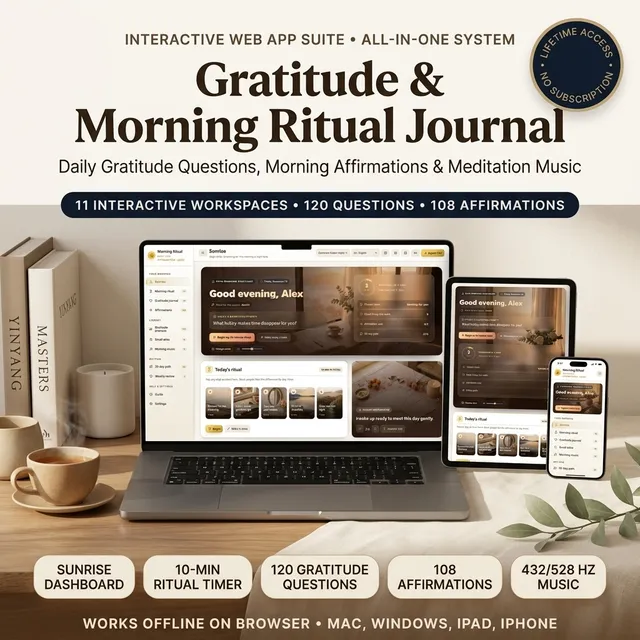
- For a 5-Minute Morning Gratitude Habit: The Gratitude Morning Ritual Journal runs locally in your browser with rotating gratitude prompts, Mood Check-in, Quick Capture, Morning Affirmation drawer, Ritual Timer, Streak & Reflection History, plus a printable PDF companion guide if you enjoy switching back to paper occasionally.
What Real Users Say on Reddit About Digital Journaling on iPad
Browse long threads across productivity and handwriting communities on Reddit and the same practical lessons show up repeatedly from multi-year tablet journalers:
- Blank Templates Don't Build Consistency: Dozens of users admit buying elaborate 400-page hyperlinked planners, spending three nights adding pastel covers, and abandoning them by day ten because deciding what to write took too much mental energy.
- Zooming Fatigue Is Real: Writing tiny cursive inside rigid PDF boxes forces constant two-finger pinching; wide lined margins or guided input cards prevent hand cramping.
- Searchability Wins Over Aesthetics Long-Term: Typed entries and tagged emotional check-ins let you review recurring themes months later, whereas raw handwriting sometimes stays buried unless converted to text.
According to wellness research summarized by UC Berkeley’s Greater Good Science Center, expressive writing lowers emotional rumination when focused on honest labeling and meaning-making rather than performative perfection.
Digital Diary, Reading Notes & Bullet Workflows on Your iPad
Once your core daily page feels effortless, an iPad makes it easy to keep specialized spaces separate without carrying four physical notebooks in your bag:
- Private Digital Diary: Lock sensitive emotional pages behind Face ID in Apple Notes or keep them stored offline in a browser workspace that never touches cloud servers.
- Digital Reading & Book Journal: Paste favorite passage quotes alongside one honest takeaway per chapter instead of hoarding highlights you never revisit.
- Bullet-Style Flexible Logs: Use simple dot checklists inside GoodNotes or minimal daily checkboxes so unfinished tasks roll forward cleanly without guilt.
Looking for visual intention work alongside daily journaling? Explore our side-by-side picks for the best digital vision board apps next.
Công cụ tra cứu miễn phí cùng chủ đề

Áp dụng ngay
Đưa bài viết này vào thực hành
Suốt hơn 8 năm qua, cộng đồng hơn 2,4 triệu người theo dõi và 38.000+ học viên đã chia sẻ kết quả thật khi duy trì những thực hành này trong tình yêu, tài chính và sự bình an.
 Sổ Tay Kịch Bản Luật Hấp Dẫn & Bảng Điều Khiển Hòa Nhịp Bản Thể Tương Lai
- Một web app thay cho cuốn sổ cộng thêm các file nhạc riêng: viết kịch bản mỗi ngày, biểu đồ thang Hawkins, viết lại niềm tin và nhạc 432 Hz, 528 Hz có sẵn trong cùng một chỗ, mở trên điện thoại hay laptop.
- Giữ vòng viết 3–5 phút mỗi ngày, có điểm độ sống động 5 giác quan cho từng đoạn kịch bản.
- Theo dõi cảm xúc dịch chuyển từ sợ hãi tới bình an trên biểu đồ thang Hawkins.
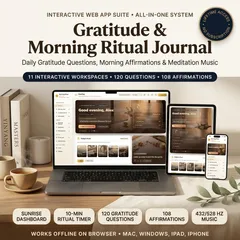 Nhật Ký Biết Ơn & Nghi Thức Buổi Sáng — Sổ Biết Ơn Mỗi Ngày, Câu Khẳng Định Buổi Sáng & Nhạc Thiền
- Bấm Bắt đầu, đồng hồ dẫn bạn qua nghi thức buổi sáng mười phút bình yên, từng bước một.
- Mỗi ngày trả lời một câu hỏi biết ơn mới trong 120 câu và nhìn bức tường biết ơn đầy dần.

Có trong cửa hàng
Sổ Kế Hoạch 2027 (Mục Tiêu, Thói Quen & Lịch Trăng)
Biến 2027 thành năm mục tiêu của bạn thật sự thành hiện thực. Mỗi thói quen hằng ngày gắn với một mục tiêu thật, biểu đồ tiến độ cho biết bạn có đúng hướng không, và phần nhìn lại hằng tuần tự điền sẵn.
Nguồn tham khảo & Đối chiếu
- [1]UC Berkeley Greater Good Science Center — How Journaling Can Help You in Hard Times ↗
- [2]Apple Support — Use Markup on your iPhone, iPad, or iPod touch ↗
Được biên tập theo chuẩn thực hành chánh niệm & phát triển cá nhân. Chính sách biên tập

Bộ Sổ Tay & Hệ Thống Tương Tác Đi Kèm

Câu chuyện thật
Xem mọi câu chuyện →Người đọc đã thay đổi thế nào với những thực hành này
Suốt hơn 8 năm qua, cộng đồng hơn 2,4 triệu người theo dõi và 38.000+ học viên đã chia sẻ kết quả thật khi duy trì những thực hành này trong tình yêu, tài chính và sự bình an.
 Chuyện tình yêu
Nhật ký Twin Flame có hiệu quả không? Câu chuyện thật
Nhật ký twin flame có hiệu quả không? Câu chuyện thật về chữa lành sau chia tay, thu hút tri kỷ, tìm lại bình yên và cách luyện tập mỗi ngày.
Xem cẩm nang Chuyện tiền bạc
Nhật ký thu hút tiền bạc có hiệu quả không? Chuyện thật
Nhật ký thu hút tiền bạc có hiệu quả không? Câu chuyện thật về trả hết nợ, xin tăng lương, bớt lo âu tiền bạc và cách luyện tập mỗi ngày.
Xem cẩm nang
 Chuyện tình yêu
Thu hút tình yêu sau chia tay: chuyện chữa lành có thật
Câu chuyện thật về thu hút tình yêu sau chia tay: dùng câu khẳng định yêu bản thân, soi gương và nhật ký tình yêu để chữa lành trước rồi mở lòng lại.
Xem cẩm nang Chuyện tiền bạc
Thu hút cuộc sống sạch nợ: câu chuyện thật
Câu chuyện thật về thu hút cuộc sống sạch nợ: kết hợp câu khẳng định tiền bạc, nhật ký thịnh vượng với mục tiêu rõ, hạn chót và bằng chứng mỗi ngày.
Xem cẩm nang Chuyện tình yêu
Thu hút tri kỷ: câu chuyện thật bắt đầu từ bên trong
Câu chuyện thật về thu hút tri kỷ: viết kịch bản người bạn đời lý tưởng, làm bảng tầm nhìn và mở lòng với cuộc sống trước khi tình yêu đến.
Xem cẩm nang Chuyện tiền bạc
Thu hút tăng lương: câu chuyện thật về sự tự tin
Câu chuyện thật về thu hút tăng lương, thăng chức: gỡ niềm tin cản trở, luyện câu khẳng định tự tin và ghi bằng chứng trước khi đề nghị.
Xem cẩm nang Chuyện tình yêu
Câu chuyện đoàn tụ twin flame: hành trình thật về bình yên
Câu chuyện đoàn tụ twin flame có thật: dùng các giai đoạn hành trình, sổ dấu hiệu và thiền dẫn để tìm bình yên khi xa cách, dù có quay lại hay không.
Xem cẩm nang Chuyện tiền bạc
Từ lo âu tiền bạc đến bình tâm: câu chuyện thật
Câu chuyện thật về vượt qua lo âu tiền bạc: một bài thiền ngắn trước khi xem tài khoản, buổi hẹn hò với tiền mỗi tuần và soi lại niềm tin cũ.
Xem cẩm nang
Hướng dẫn liên quan

Bài viết khác


Đang được đọc nhiều
Bài mọi người mở nhiều nhất tuần này
Xếp theo lượt xem thật trong 7 ngày qua.

🔥 Bắt đầu Ngày 1 ngay tối nay · Mua 1 lần dùng mãi
Sổ Tay Kịch Bản Luật Hấp Dẫn & Bảng Điều Khiển Hòa Nhịp Bản Thể Tương Lai
Viết kịch bản thì hiện tại, viết lại niềm tin giới hạn, đếm các vòng 33x3 và ghi lại những dấu hiệu bạn nhận ra, tất cả trong một cuốn sổ riêng tư.
TÀI LIỆU TƯƠNG TÁC MIỄN PHÍ
Nhận Miễn Phí Bản Đồ Số Thiên Thần Năm 2027
Nhận qua email Bản Đồ Số Thiên Thần 2027 kèm bảng tự tra Năm Cá Nhân, con số dẫn đường từng tháng và góc riêng viết ý định cả năm.
Theo dõi Yin Yang Masters
Nghi thức mỗi ngày ngay trên bảng tin của bạn
Hướng dẫn ngắn, nghi thức theo trăng và cách dùng sổ kế hoạch từ Yin Yang Masters.




Khám phá thêm
Thêm từ Yin Yang Masters



Hỏi Yinyang Masters ngay trong trợ lý AI của bạn
Nhận cùng phép tính và gợi ý ngay trong khung chat: thêm app Yinyang Masters miễn phí rồi hỏi bằng lời thường. Không cần tài khoản.
Thử hỏi: “Tìm bài hướng dẫn Yinyang Masters về bắt đầu thực hành tâm linh mỗi ngày.”

Đang trực
Gặp Moon Keeper, người giữ điện thờ trực tiếp
Mỗi giờ Moon Keeper đọc bầu trời, rút một lá tarot và chia sẻ một bài tĩnh tâm 3 phút. Ghé điện thờ, theo dõi nhật ký từng giờ và để lại lời nhắn trong sổ khách.

BẢN TIN MIỄN PHÍ MỖI NGÀY
Nhận Bản Tin Yin Yang Masters Mỗi Ngày
Mỗi ngày một email ngắn: một thực hành cho hôm nay, một câu chuyện thật của bạn đọc và bài hướng dẫn mới nhất về tình yêu, tiền bạc, sự bình an.
Suốt hơn 8 năm qua, cộng đồng hơn 2,4 triệu người theo dõi và 38.000+ học viên đã chia sẻ kết quả thật khi duy trì những thực hành này trong tình yêu, tài chính và sự bình an.