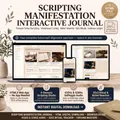

Direct answer: The best digital journal for iPad depends on whether you prefer handwriting with an Apple Pencil or typing fast reflection prompts. GoodNotes paired with a hyperlinked PDF works best for stylus note-takers, Apple Journal and Day One fit quick mobile entries, while offline interactive web journals run cleanly in Safari without subscriptions.
Best Digital Journal for iPad (Apps, PDFs & Offline Web Kits)

Jennie Uyen Chu
意识与能量专家

本文目前仅有越南语版本,中文版正在翻译中。
互动实践数字系统 · 完整版8 个模块
显化剧本互动日志与未来自我量子同频工作手册
每天只需 3–5 分钟,你的脚本更生动,当场改写限制性信念,并看见情绪从恐惧逐渐转向平静。
网页应用,手机或电脑都能用。用现在时写剧本,改写限制性信念并记录33x3轮次。无需填写出生日期。
👥 3.8万+学员👥 38,000+ 学员 · 240万+ 社群
US$29.99US$22.49US$29.99₫789,000₫591,000₫789,000第 1 步 · 点击你平时最容易半途而废的痛点:
这套应用如何帮你彻底解决
每天都回来看的未来自我支柱让那个人一直在身边,小选择也渐渐像新的你。
内含对应工具: 未来自我支柱写清你正在成为谁、什么时候、想以怎样的状态生活,需要动力时还有来自未来自己的简短提示。
第 2 步 · 直观查看应用真实模块界面
新身份总览面板
8 个模块 · 2 个免费试用标签页在开始书写前清晰锚定未来自我的日常习惯、情绪准则与行动风貌。
一次买断 · 终身可用 · 付款后即刻发送至邮箱

免费领取 2027 天使数字年度地图
通过邮件领取《2027 天使数字年度地图》,内附 2027 个人年速查、每个月的天使数字与全年意图书写空间。
Choosing a setup gets much simpler once you decide whether digital pages actually beat a pocket notebook for your daily habits. If you are still weighing tactile paper against screens, start with our honest breakdown of is a planner worth it: paper vs. digital before spending an entire weekend downloading templates.
Can You Use a Digital Journal for iPad Effectively?
Yes—an iPad turns into a remarkably reliable reflection space when you strip out notifications and treat one focused workspace as your morning desk. Most people quit a digital journal for iPad not because the hardware lacks features, but because opening a multi-purpose tablet pulls them straight toward email badges, social tabs, or fifteen competing folders.
Before picking software, match your tool to how you naturally think at 7:00 AM or 10:00 PM:
- Slow Handwriting Mode: If moving an Apple Pencil across glass slows racing thoughts down, you want a PDF annotation app or Apple Freeform rather than a sterile plain-text box.
- Fast Typing Mode: If you think faster on a Magic Keyboard or onscreen thumb typing, native journal apps or browser-based guided workbooks remove wrist fatigue and keep entries searchable.
- Privacy-First Mode: If cloud syncing worries you when writing honest fears, emotional triggers, or relationship thoughts, look for apps with end-to-end encryption or local-storage web tools that never upload entries to external servers.
For readers moving across phones as well as tablets, check how tablet tools compare against pocket options in our overview of the best journal apps.
How to Set Up a GoodNotes Journal Template or Digital Notebook for iPad
Knowing how to build or import a digital notebook for iPad saves hours of tinkering. If you love handwriting with an Apple Pencil, pairing GoodNotes or Notability with a hyperlinked PDF GoodNotes journal template gives you tabbed monthly dividers, lined margins, and zero typing lag.
免费在线测算工具
生命灵数计算器
快速解答
有。显化剧本互动日志与未来自我量子同频工作手册正是为此设计:每天3–5分钟的书写练习,每段剧本都有五感生动度评分。
 显化剧本互动日志与未来自我量子同频工作手册查看交互式手册 →
The 4-Step iPad Journaling Setup (Zero Overdesign)
- Create One Dedicated Focus Mode: Set a “Reflection” Focus on iPadOS that hides badges from Slack, Mail, and messaging apps and keeps only one home-screen dock icon visible.
- Import Once, Copy Tomorrow: Save one clean blank reflection template—morning intention, three gratitude lines, evening unwind—inside your top folder so starting tomorrow takes two taps instead of hunting fonts.
- Add a Matte Screen Layer If Glass Feels Slippery: Many stylus writers drop digital notebooks simply because bare glass feels slick; a removable magnetic matte cover restores gentle paper-like drag.
- Set a Weekly Sunday Archive Rule: Export or summarize one key lesson every Sunday evening so entries become real self-awareness instead of unread digital clutter.
If you want structured calendar blocks sitting alongside those written pages, see how daily scheduling fits in our guide to the best digital planners for iPad.
Free Digital Journal Apps and Templates for iPad Worth Testing
You do not have to pay for an annual subscription before discovering whether tablet journaling sticks. Several reliable free options run smoothly on modern iPadOS builds:
- Apple Notes & Apple Freeform (Free, Built-In): Surprisingly strong for zero-setup sketching, Apple Pencil handwriting, and locking sensitive notes behind Face ID without installing anything new.
- Apple Journal (Cross-Device Context): Works smoothly for iPhone and expanding Apple ecosystem workflows when you want quick photo, audio, and location prompts pulled directly from your day.
- Day One Free Tier: Clean chronological timeline for typed reflections, markdown formatting, and single-journal syncing before deciding whether multi-notebook media storage matters.
- Simple Unlinked PDFs in Apple Books or Files: You can annotate any flat PDF workbook directly inside the built-in iPadOS Markup engine for free, though internal hyperlink tabs work faster inside GoodNotes or Noteful.
Best Digital Journal for iPad vs. Digital Journal for Tablet Options
Once you start comparing paid suites against a cross-platform digital journal for tablet setups (especially if you switch between an iPad at home and an Android tablet, Windows laptop, or desktop at work), platform lock-in becomes a deciding factor.
| Tool / Format | Best For | Handwriting vs. Typing | Sync & Privacy | Cross-Tablet Portability |
|---|---|---|---|---|
| GoodNotes + PDF Template | Stylus writers & bullet layout lovers | Apple Pencil first | iCloud / manual PDF export | Strongest on iPadOS & Mac |
| Noteful | Lightweight one-time unlock layer notes | Apple Pencil with layers | Local + iCloud backup | iPadOS / iOS focused |
| Day One | Daily text logs & photo memories | Keyboard & voice transcription | Cloud sync + end-to-end option | Apple, Android & web |
| Interactive Offline Web Kits | Guided prompting & local browser privacy | Fast typing & structured clicks | 100% browser localStorage | Runs on iPad Safari, Android, Mac & PC |
If your goal is guided mindset or morning reflection rather than blank lined paper, an offline browser-based journal opens directly in Safari and keeps your entries private on your device:
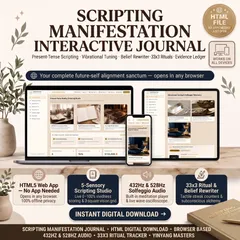
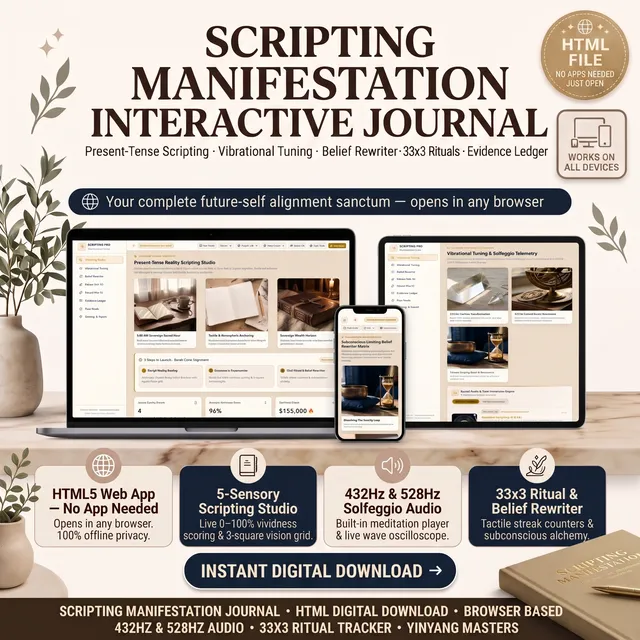
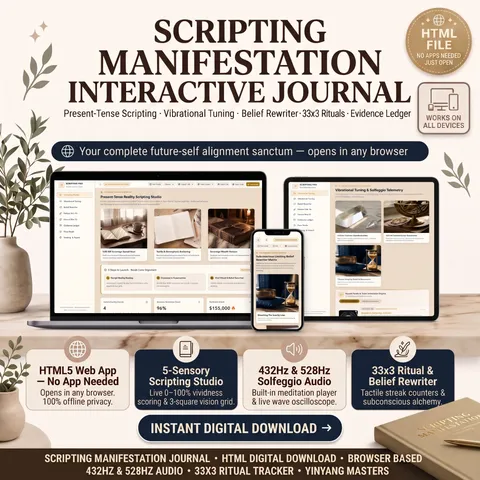
- For Guided Scripting & Clarity Work: The Scripting & Manifestation Interactive Journal runs offline inside any tablet or desktop browser using local storage—offering a 369 Scripting Engine, Vision Clarity Board, Daily Future Self Entry, Alignment Score Tracker, Guided Writing Prompts, and Manifestation Milestones log without cloud signups.
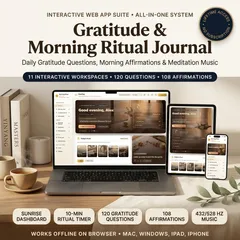
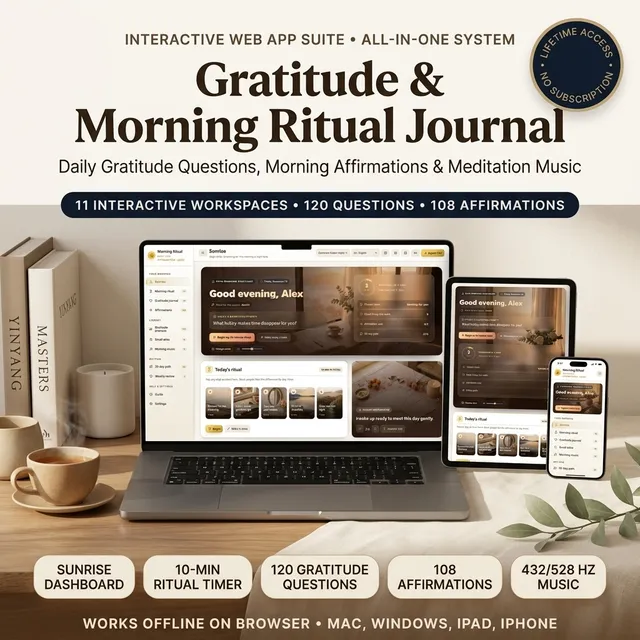
- For a 5-Minute Morning Gratitude Habit: The Gratitude Morning Ritual Journal runs locally in your browser with rotating gratitude prompts, Mood Check-in, Quick Capture, Morning Affirmation drawer, Ritual Timer, Streak & Reflection History, plus a printable PDF companion guide if you enjoy switching back to paper occasionally.
What Real Users Say on Reddit About Digital Journaling on iPad
Browse long threads across productivity and handwriting communities on Reddit and the same practical lessons show up repeatedly from multi-year tablet journalers:
- Blank Templates Don't Build Consistency: Dozens of users admit buying elaborate 400-page hyperlinked planners, spending three nights adding pastel covers, and abandoning them by day ten because deciding what to write took too much mental energy.
- Zooming Fatigue Is Real: Writing tiny cursive inside rigid PDF boxes forces constant two-finger pinching; wide lined margins or guided input cards prevent hand cramping.
- Searchability Wins Over Aesthetics Long-Term: Typed entries and tagged emotional check-ins let you review recurring themes months later, whereas raw handwriting sometimes stays buried unless converted to text.
According to wellness research summarized by UC Berkeley’s Greater Good Science Center, expressive writing lowers emotional rumination when focused on honest labeling and meaning-making rather than performative perfection.
Digital Diary, Reading Notes & Bullet Workflows on Your iPad
Once your core daily page feels effortless, an iPad makes it easy to keep specialized spaces separate without carrying four physical notebooks in your bag:
- Private Digital Diary: Lock sensitive emotional pages behind Face ID in Apple Notes or keep them stored offline in a browser workspace that never touches cloud servers.
- Digital Reading & Book Journal: Paste favorite passage quotes alongside one honest takeaway per chapter instead of hoarding highlights you never revisit.
- Bullet-Style Flexible Logs: Use simple dot checklists inside GoodNotes or minimal daily checkboxes so unfinished tasks roll forward cleanly without guilt.
Looking for visual intention work alongside daily journaling? Explore our side-by-side picks for the best digital vision board apps next.
同主题免费在线测算工具

马上实践
把这篇文章用起来
8多年来,超过240万名关注者和3.8万+名学员组成的社群,分享了坚持这些练习后在爱情、财富和内心平静上的真实变化。

参考来源与核验资料
- [1]UC Berkeley Greater Good Science Center — How Journaling Can Help You in Hard Times ↗
- [2]Apple Support — Use Markup on your iPhone, iPad, or iPod touch ↗
依据正念实操与个人成长编辑规范审校。 编辑政策

配套交互式手册与系统
真实故事
查看全部故事 →读者如何因这些练习而改变
8多年来,超过240万名关注者和3.8万+名学员组成的社群,分享了坚持这些练习后在爱情、财富和内心平静上的真实变化。
 爱情故事
双生火焰日记有用吗?真实故事与每日练习
双生火焰日记真的有用吗?分享走出分手、迎来灵魂伴侣、找回平静的真实经历,并展示每天的练习在日记里是什么样子。
阅读指南 金钱故事
金钱显化日记有用吗?真实故事
金钱显化日记真的有用吗?分享还清欠款、争取加薪、缓解金钱焦虑的经历,并展示每天的练习在日记里是什么样子。
阅读指南
 爱情故事
分手后如何显化爱情:真实疗愈故事
分手后如何显化爱情?分享人们如何用自爱肯定语、照镜子练习和爱情日记先疗愈自己,再重新敞开心扉的真实经历。
阅读指南 金钱故事
显化无债生活:稳步还清欠款的真实故事
如何显化无债生活?分享人们如何把金钱肯定语、丰盛日记与清晰目标、截止日期和每日证据结合起来,稳步走向无债。
阅读指南 爱情故事
显化灵魂伴侣:从内在开始的真实故事
如何显化灵魂伴侣?分享人们如何写下理想伴侣脚本、制作爱情愿景板,并在爱到来之前先对生活说“好”。
阅读指南 金钱故事
显化加薪:自信开口的真实故事
如何显化加薪或升职?分享人们如何清理金钱信念、练习自信肯定语,并在开口前记录下自己的成绩。
阅读指南 爱情故事
双生火焰重逢故事:走向平静的真实旅程
真实的双生火焰重逢故事:人们如何借助旅程阶段、征兆记录和引导冥想,在分离期间找回平静,无论最终是否重逢。
阅读指南 金钱故事
从金钱焦虑到与钱和解:真实故事
分享缓解金钱焦虑的经历:查看账户前听一段简短的引导冥想,每周一次金钱约会,并温和地审视旧信念。
阅读指南
相关指南

更多文章

热门内容
本周读者最常打开的内容
按过去 7 天的真实访问量排序。
免费互动指南
免费领取 2027 天使数字年度地图
通过邮件领取《2027 天使数字年度地图》,内附 2027 个人年速查、每月指引天使数字与专属年度意图书写空间。
关注我们
每天的仪式,就在你的动态里
Yin Yang Masters 的简短指南、月相仪式和计划本使用教程。






在 AI 助手中直接询问 Yinyang Masters
在聊天中获得同样的计算与指引:添加免费的 Yinyang Masters 应用,然后用日常语言提问。无需注册账号。
试着问: “找一篇关于开始每日灵性练习的 Yinyang Masters 指南。”

正在直播
认识 Moon Keeper,我们的直播祭坛守护者
Moon Keeper 每小时观察星象、抽一张塔罗牌,并分享一段 3 分钟的静心练习。来祭坛看看,关注每小时日记,并在留言簿里写下你的话。

每日免费通讯
每天收到 Yin Yang Masters 通讯
每天一封简短邮件:一个今日练习、一个读者的真实故事,以及关于爱情、财富与内心平静的最新指南。
8多年来,超过240万名关注者和3.8万+名学员组成的社群,分享了坚持这些练习后在爱情、财富和内心平静上的真实变化。